 RealShear for PSX
RealShear lets users of the PSX 747-400 simulator experience, train for and analyse wind shear encounters caused by severe meteorological phenomena such as the microbursts associated with thunderstorms.
These phenomena have led to numerous crashes and near misses throughout aviation history. Training for the correct escape manoeuvre is an integral part of type rating and multi crew training. Traditionally this kind of simulation exists only in the "big" simulators at airline training facilities, where an instructor station allows failures, weather, traffic and wind shear events to be injected at critical phases of flight.
RealShear emulates that instructor station. Shears of arbitrary severity can be triggered at critical phases of flight, defined by radio altitude and relative to performance critical speeds such as Vr, just as in the big simulators.
Historical scenarios
The software incorporates the actual data from several historical shear events, translated from flight data recorder evaluations into PSX wind shear injections:
- Delta Air Lines flight 191 at Dallas Fort Worth, and from the same event, American Airlines 539
- The takeoff accident of Pan American 759 in New Orleans
- The takeoff incident of Continental Airlines 63 at Tucson
- The landing accident of US Air 1019 at Charlotte
The free demonstration version runs for 10 minutes. The historical events are not available in the free demo, but the 14 other, customisable scenarios are.
Downloads
Requires PSX 10.0.5 beta 9 or later. If RealShear runs on the same computer as PSX, the Java Runtime Environment (JRE) is already installed and the smaller setup is sufficient. If no JRE 1.7 or later is installed, or the small installer reports that no compatible JRE was found, choose the Standalone download. It is self contained, installs no runtime in your system, and cannot be broken by other applications updating or removing the local JRE.
- WindowsSetup, 6 MB
- Windows StandaloneSelf contained, about 50 MB
- MacSetup, 6 MB
- Mac StandaloneSelf contained, about 50 MB
- LinuxArchive, 3 MB
Licenses
There are four license levels. The standard, patron and commercial editions are functionally identical but differ in the scenarios you are allowed to use them in. There is no upgrade path between levels. A license includes all major and minor upgrades for its validity period, typically one year from purchase.
| License | 12 months, all platforms | Notes |
|---|---|---|
| Free | Free | Extended demonstration version. Historical wind shear events are not included. Obtain your free license code. |
| Standard | USD 9.99 | Private use. All scenarios. |
| Patron | USD 49.99 | As standard, for those who feel the hundreds of hours behind this project deserve it. "Patron Edition" shows in the task bar. |
| Commercial | USD 199.99 | Full commercial and private use. |
Standard, patron and commercial licenses are not valid for commercial use unless stated. Commercial use includes any simulator facility for rent or hire, airline training facilities, and any training course where you or the organiser receive financial benefit. A commercial license is required whenever the software is run at such a facility, whether or not it is used during the training session.
To purchase a standard, patron or commercial license, email billing@inside.net with your name and the license level. Your license code is generated and emailed to you. Check your spam folder if it has not arrived within a few minutes.
A typical use case
Brief yourself, or your crew, on the training scenario. In this example we look at a non predictive shear that triggers as the aircraft descends through 1200 ft on the radio altimeter. The goal is to lose as little altitude as possible and to conduct a safe go around.
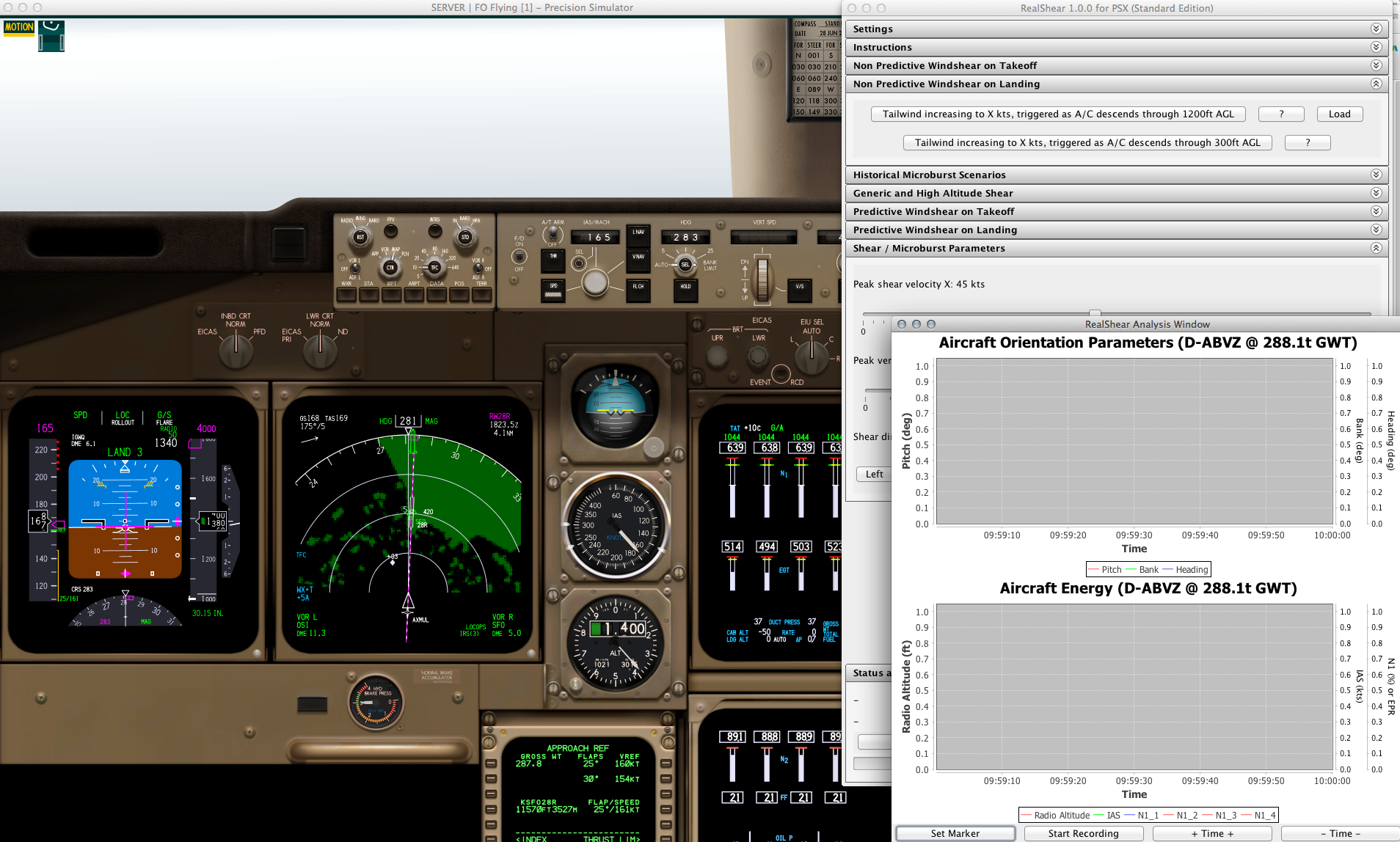
Start PSX, then RealShear. The software remembers its window positions and reconnects to PSX on startup. Open the "Non Predictive Windshear on Landing" task panel and click "Load" next to the first button. PSX repositions itself about 6 NM out on the ILS for runway 28R at KSFO and remains in motion freeze. At the bottom of the RealShear window, click "Show Analysis Window" in the "Status and Analysis" pane. All of this is best run on separate computers, but a single screen works:
Open the "Shear / Microburst Parameters" panel and set the lateral shear (direction X) and the vertical shear (Z) with the sliders. For this example use 50 kt for X and about 2500 fpm for Z. Click "Tailwind increasing to X kts, triggered as A/C descends through 1200ft AGL" to arm the event, switch to PSX and press m to release the motion freeze, then bring the analysis window to the foreground. You can record manually, or let RealShear start and stop the recording for the duration of the event. Then watch, and be ready to press TO/GA.
The status line now reads "Waiting for activation criteria to be met: RA less than 1200", followed by the injection parameters. To change them, abort the event on its button, adjust the sliders, and re-arm.
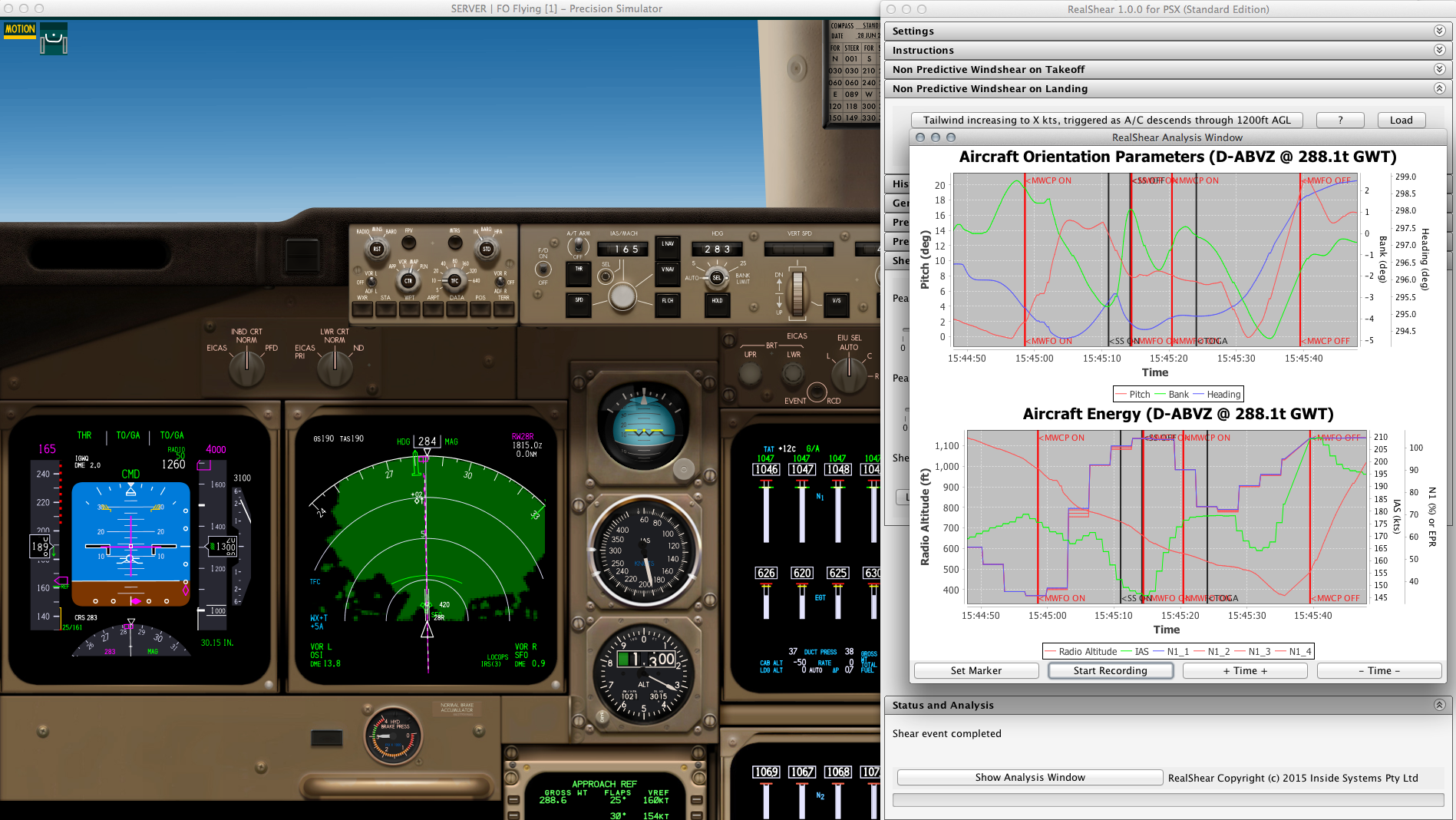
Surviving a severe wind shear is about kinetic energy management, and the lower plot demonstrates this. Zoom and pan with the mouse; a right click lets you save the plot as a PNG.
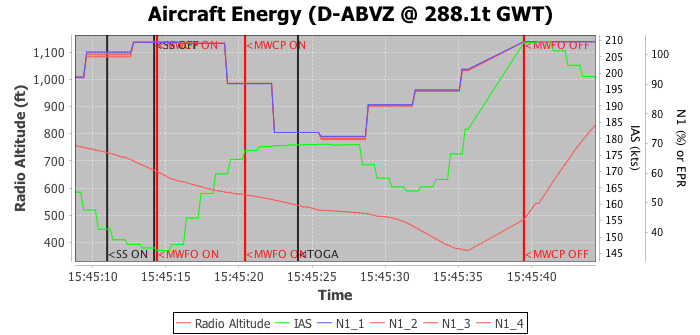
For this demonstration we intentionally reacted too slowly and let the kinetic energy decay. At 15:45:11 the stick shaker activates: we are at alpha max, shortly before a stall, and indicated airspeed (green) continues to fall. Four seconds later the stick shaker stops because the nose has been pushed down to unload the wings:
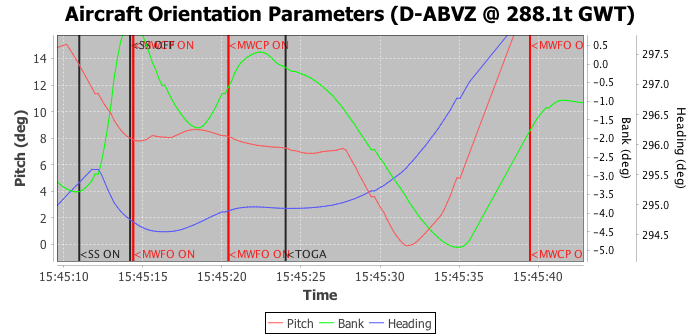
The same event markers appear here. From 15:45:10 the nose is lowered continuously. At 15:45:00 the Captain and First Officer master warnings fired on the wind shear alert, another warning at 15:45:14, and ten seconds later TO/GA is pressed. From that moment it takes a further 150 ft and 8 seconds until a positive rate of climb is established. How would it have turned out with an earlier TO/GA, or with more speed to begin with? RealShear lets you examine as many scenarios as you like. For real world pilots it builds understanding of energy management; for everyone else it is simply a very interesting ride.
Release history
1.0.4
- Update to support PSX 10.1
1.0.2
- Plot annotation labels vertical for improved legibility
- Fixed version check error
- Charlotte 1994 shear accident available in the free version
- Added COA63 takeoff incident at Tucson
1.0.1
- Added support for Free, Standard, Patron and Commercial licenses
1.0.0
- First public release